


Are You Spending Entire Days Manually Refreshing Listings?
If you sell regularly on Vinted, you probably know this problem: dozens of listings need daily refreshing, hundreds of messages await responses, and every price change must be entered manually. It’s frustrating, time-consuming, and… completely unnecessary.
80% of e-commerce experts in 2024 declared increased investment in automation and AI — this isn’t a coincidence. In times when the global e-commerce market has reached $5.8 trillion in 2023, automation has stopped being a luxury — it’s become a necessity.
What Exactly Is Vinted Sales Automation?
It’s simple: instead of you, specialized programs perform routine tasks. They work 24/7, don’t make mistakes, and don’t need coffee breaks. Your listings are automatically refreshed at optimal times, responses sent instantly, and prices updated with one click.
The result? More time for what really matters: finding new products, taking better photos, and growing your business.
Concrete Benefits You Can Measure
Time Savings: From Hours To Minutes
Instead of spending 2-3 hours daily on routine tasks, you need a maximum of 15 minutes to configure automation. That’s 10-12 hours weekly back in your hands.
Fact: If your working hour is worth $50, automation saves you $500-600 weekly in time alone.
Better Visibility = More Sales
Vinted’s algorithm promotes active listings. Automatic refreshing ensures your products rank higher in search results, directly translating to more views and transactions.
Average results after implementing automation:
- 20-40% increase in views
- 15-25% improved conversion
- 80% reduction in management time
Zero Mistakes In Offer Management
Manual editing leads to errors: wrong prices, typos in descriptions, forgotten promotions. Programs execute commands precisely and consistently.
Professional Customer Service
Instant responses to buyer questions increase your credibility and chances of closing transactions. 73% of consumers shop online — first contact determines success.
Why Automation Is Crucial In 2025?
Rising Consumer Expectations
We live in an era of lightning deliveries and instant responses. 90% of customers consider instant customer service crucial or very important — these same standards apply to customer service.
Intensifying Competition
Millions of new offers appear daily on Vinted. Process automation becomes a key factor in building competitive advantage.
Platform Evolution
Vinted introduces new features (electronics category, Vinted Go, Vinted Pay), requiring efficient management of more parameters.
Tool Types: Find Your Solution
For Beginner Sellers (20-50 Offers)
Automatic refreshing and promotion
- Programs automatically “bump” offers at optimal times
- Basic response templates
- Simple price management
Cost: From $10-15/month
For Medium Sellers (50-200 Offers)
Bulk editing and quick responses
- Change prices of multiple products simultaneously
- Automatic responses to frequently asked questions
- Basic performance analytics
- Publication scheduling
Cost: From $15-30/month
For Professionals (200+ Offers)
Full business integration
- Synchronization with inventory systems
- Automatic invoicing
- Advanced sales analytics
- Multi-platform integration
Cost: From $30-100/month
Review Of The Best Tools On The 2025 Market
BASIC Category – For Beginners (20-50 Offers)
???? VBot (Chrome Extension)
Key Features:
- ✅ Automatic likes on Vinted page articles
- ✅ Auto-follow/unfollow accounts
- ✅ Favorites management
- ✅ Planned messaging features
Pros:
- Completely free
- Simple to use
- Regular updates
Cons:
- Very limited features
- Basic technical support
- No advanced options
Ideal for: Testing automation without financial commitments
INTERMEDIATE Category – For Medium Sellers (50-200 Offers)
???? V-Tools (Web Platform)
Key Features:
- ✅ Ultra-fast refreshing bot
- ✅ Integrated customer relationship management
- ✅ Auto-repost with shadowban bypass
- ✅ Vinted account generator
- ✅ Multi-account management
Pros:
- Modern interface
- Advanced technical features
- Active Discord community
- Secret technology (according to creators)
Cons:
- No transparent pricing
- New platform – limited reviews
- Requires joining Discord for support
Ideal for: Technical users wanting to test the latest solutions
???? Dotb (Chrome Extension)
Key Features:
- ✅ Automatic listing refresh
- ✅ Automatic messages and offers
- ✅ Wardrobe management panel with filters
- ✅ Bulk photo editing
- ✅ Multi-account management
- ✅ Order export to CSV
Pros:
- Comprehensive features in one tool
- Conversation management panel
- Bulk operations
Cons:
- Mixed stability opinions (3.6/5)
- No transparent pricing policy
Ideal for: Sellers needing advanced management
???? VatBot
Key Features:
- ✅ Automatic copying and re-uploading offers
- ✅ Auto-following bot
- ✅ Personalized automatic messages
- ✅ Favorites group management
- ✅ Compatibility with any browser
Pros:
- Saves Vinted promotion costs through auto-repost
- Multi-platform compatibility
- Spanish origin – European market experience
Cons:
- Limited pricing information
- No detailed user reviews
Ideal for: Sellers seeking alternatives to paid Vinted promotions
PROFESSIONAL Category – For Professionals (200+ Offers)
???? Lobstr.io
Key Features:
- ✅ No-code web scraping platform
- ✅ Vinted product scraper that actually works
- ✅ AI and n8n integration for workflow automation
- ✅ Real-time monitoring and alerts
- ✅ Advanced competitive analytics
Pros:
- Most advanced no-code technology
- Flexible integrations with other tools
- Proper product for technical users
- Proven scraping solution
Cons:
- Requires technical knowledge for full utilization
- Mainly scraping tool, not comprehensive Vinted automation
- Learning curve for beginners
Ideal for: Advanced users creating custom workflows
???? Vinta
Key Features:
- ✅ Comprehensive accounting for Vinted sales
- ✅ Automatic order tracking
- ✅ Cost and profit analysis
- ✅ SKU management and inventory states
- ✅ UK tax requirement compliant reports
- ✅ Shipping label generator and download
Pros:
- Only tool focused on Vinted accounting
- Professional approach to tax compliance
- Detailed business analytics
- UK market expertise
Cons:
- Mainly focused on UK market
- More accounting features, less sales automation
- New tool – limited track record
Ideal for: UK-based companies requiring professional accounting
ENTERPRISE Category – For Companies (500+ Offers)
???? SellerAider (Multi-Platform Suite)
Key Features:
- ✅ Cross-listing on multiple platforms
- ✅ Growth bot for Vinted automation
- ✅ Large-scale bulk operations
- ✅ Automated re-listing and sharing
- ✅ Community engagement tools
- ✅ Educational content and guides
Pros:
- Multi-platform approach (not just Vinted)
- Active blog with tips and strategies
- Focus on education and tools
- Proven in reseller community
Cons:
- Not exclusively focused on Vinted
- Requires subscription for advanced features
- May be overkill for small operations
Ideal for: Multi-platform sellers needing scalable solutions
How To Choose A Tool That Actually Works?
Step 1: Assess Your Needs
Basic questions:
- How many listings do you have? (currently and planned)
- Which tasks take most of your time?
- What’s your budget? (remember ROI)
- Do you plan to expand sales to other platforms?
Step 2: Check Terms Of Service Compliance
Key question: Does the tool behave like a natural user?
Red flags (avoid):
- Too frequent actions (spam detection)
- No randomization of action timing
- Non-compliance with API limits
- No technical support in English
Green flags (look for):
- Natural delays between actions
- ToS compliance
- Regular updates
- Positive user reviews
Step 3: Test Before Buying
Most tools offer free trials. Use them to check:
Test for 7-14 days:
- Setup ease (max 30 minutes)
- Feature effectiveness (minimum 20% view increase)
- Technical support quality (response within 24h)
- Operation stability (zero critical errors)
Step-By-Step Automation Implementation Plan
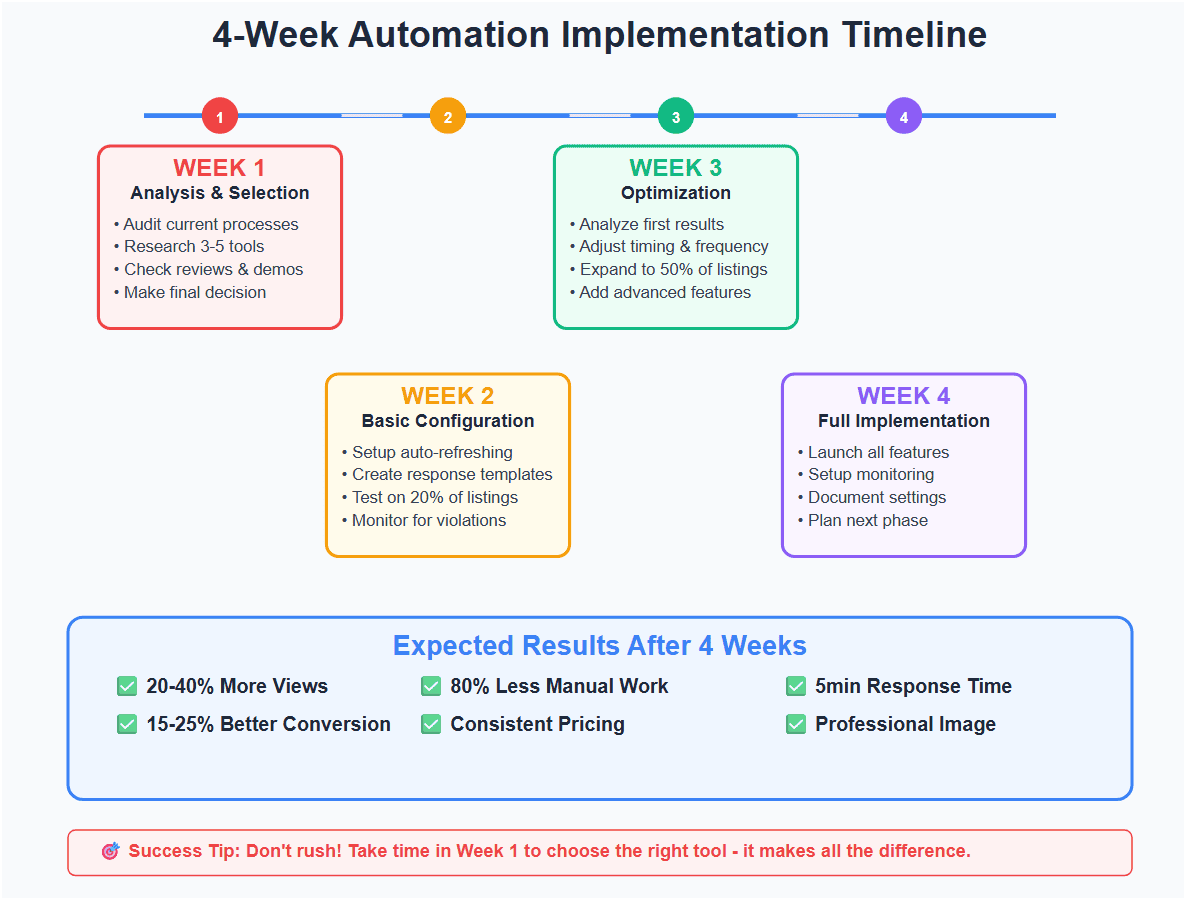
Week 1: Analysis And Selection
Day 1-2: Current state audit
- Measure time spent on routine tasks
- Identify most frequent problems
- Set automation budget
Day 3-5: Tool research
- Create list of 3-5 candidates
- Check reviews and case studies
- Contact vendors
Day 6-7: Decision
- Set up test accounts
- Choose main solution + backup
Week 2: Basic Configuration
Key settings:
- Automatic refreshing – every 6-8 hours, randomization ±2h
- Response templates – minimum 5 scenarios
- Test on 20% of offers – check operation
Checkpoints:
- Tool works stably
- The first results are positive
- No terms violations
Week 3: Optimization
Results analysis:
- Compare before/after statistics
- Identify improvement areas
- Adjust action frequency
Expansion:
- Extend to 50% of offers
- Add advanced features
- Integration with other tools
Week 4: Full Implementation
Finalization:
- Launch all features
- Set up performance monitoring
- Plan regular reviews (monthly)
Documentation:
- Save optimal settings
- Create emergency procedures
- Plan further development
Common Pitfalls And How To Avoid Them
Mistake #1: Choosing ToS-Violating Tools
Case: John chose the cheapest tool for $5/month. After 2 weeks, Vinted blocked his account for 30 days.
Effect: Lost sales + time for unblocking
Solution: Invest in proven, ToS-compliant tools
Mistake #2: Too Aggressive Automation
Case: Martha set refreshing every hour. After 3 days, her offers were marked as spam.
Effect: Visibility drop + negative ranking impact
Solution: Set natural delays (6-12h with randomization)
Mistake #3: No Results Monitoring
Case: Tom enabled automation and forgot about it for 3 months. Lost 40% of sales due to wrong settings.
Effect: Revenue loss + wasted potential
Solution: Weekly results reviews + monthly optimization
Mistake #4: Ignoring Buyer Feedback
Case: Anna’s automatic responses were too robotic. Clients complained about low service standards.
Effect: Negative reviews + conversion drop
Solution: Personalize templates + update regularly
Which Processes To Automate First?
Highest Priority (ROI 300-500%)
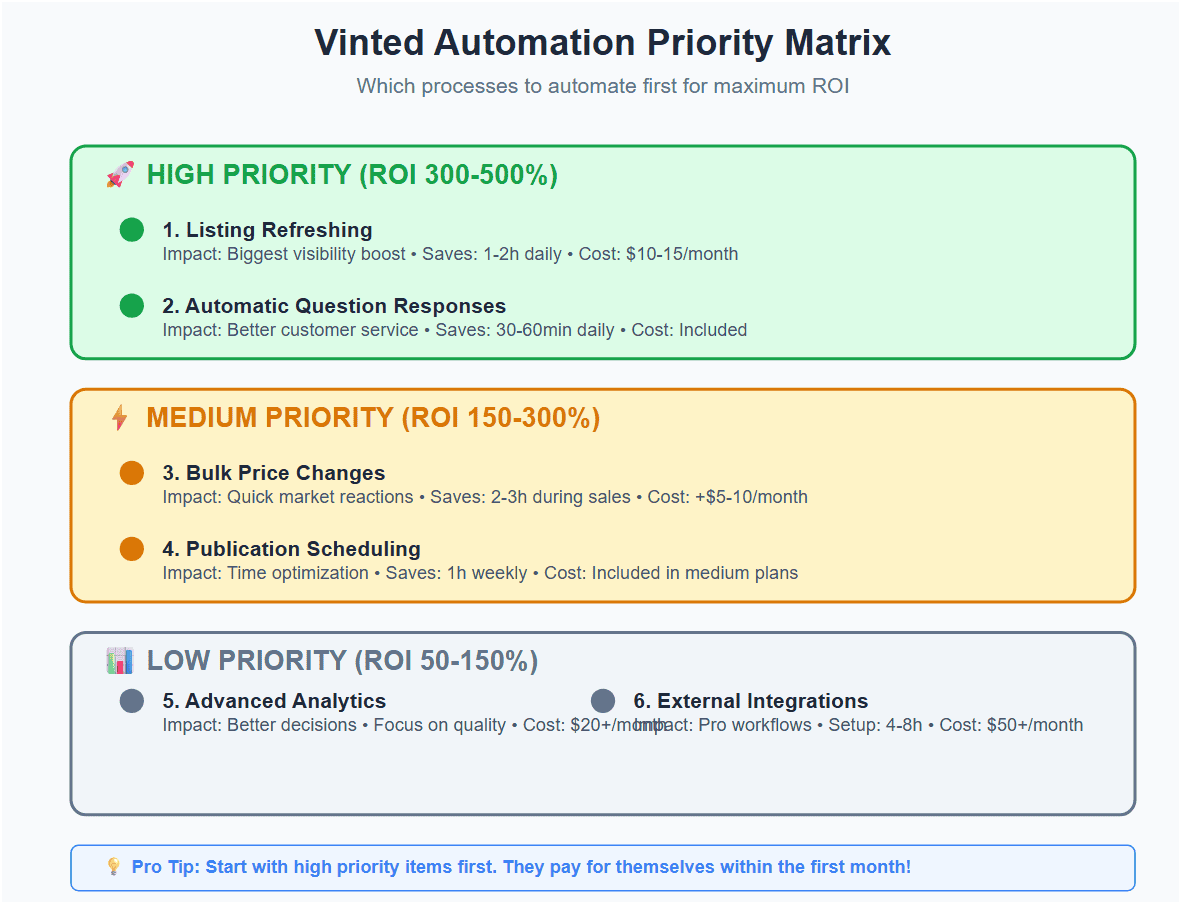
- Listing Refreshing
- Impact: Biggest visibility effect
- Savings: 1-2h daily
- Setup: 15 minutes
- Cost: $10-15/month
- Automatic Question Responses
- Impact: Better customer service, faster transactions
- Savings: 30-60 minutes daily
- Setup: 30 minutes
- Cost: Included in basic plans
Medium Priority (ROI 150-300%)
- Bulk Price Changes
- Impact: Quick market reactions, more promotions
- Savings: 2-3h during promotions
- Setup: 45 minutes
- Cost: $5-10/month additional
- Publication Scheduling
- Impact: Time optimization, better organization
- Savings: 1h weekly
- Setup: 20 minutes
- Cost: Included in medium plans
Low Priority (ROI 50-150%)
- Advanced Analytics
- Impact: Better business decisions
- Savings: Quality > quantity
- Setup: 2h
- Cost: $20+/month
- External Integrations
- Impact: Professional workflows
- Savings: Depends on scale
- Setup: 4-8h
- Cost: $50+/month
Strategic Automation Use: E-Commerce Inspirations
Similar to how professional content marketing strategies require systematic approach, Vinted automation needs long-term vision.
Multi-Platform Approach
Most successful sellers don’t limit themselves to Vinted. They use automation for:
Cross-platform synchronization:
- Vinted ↔ eBay ↔ Facebook Marketplace
- Automatic inventory updates
- Unified price management
Cross-platform analytics:
- Platform performance comparison
- Time allocation optimization
- Best category identification
Seasonal Automation
Automatic seasonal campaigns:
- Spring: Summer clothing promotions (March-April)
- Summer: Back-to-school (August)
- Fall: Winter clothes (September-October)
- Winter: Sales (January-February)
Measuring Success: Key Metrics
Before Automation (Measure For One Week):
Basic metrics:
- Time spent managing listings: ___ hours
- Weekly views: ___
- Average message response time: ___ hours
- Completed transactions: ___
- Average selling price: ___ $
After Automation (Compare After One Month):
Expected results:
- ✅ 20-40% view increase
- ✅ 80% management time reduction
- ✅ Response time improvement to 5 minutes
- ✅ 15-25% conversion increase
- ✅ Stable or higher average price
Advanced KPIs:
- Views to likes ratio
- Time to first message after publication
- Transaction completion rate
- Customer Lifetime Value (CLV)
Frequently Asked Questions About Automation
Won’t Automation Make Me Lose Personal Contact With Customers?
No, if you do it smartly. Automate operational processes (refreshing, basic responses), but maintain personal contact during negotiations and problem-solving.
Pro tip: Set automatic responses with information about availability for direct contact.
How Much Does Full Automation Really Cost?
Realistic monthly budget:
- Basic: $15-30/month
- Medium: $30-60/month
- Advanced: $60-150/month
ROI: With 50+ monthly product sales, automation pays for itself in the first month.
What Happens If Vinted Changes Their Algorithm?
Good tools adapt automatically. Choose vendors who:
- Monitor API changes
- Update systems quickly
- Have dedicated R&D teams
Can I Automate Sales On Multiple Platforms Simultaneously?
Yes! Advanced tools offer integrations with:
- eBay, Facebook Marketplace, Poshmark
- Shopify, WooCommerce
- Inventory and CRM systems
Note: Each platform has different terms — check compliance.
How Long Does Full Implementation Take?
Typical timeline:
- Week 1: Selection and basic setup
- Week 2-3: Optimization and testing
- Month 1-2: Full integration and training
- Month 3+: Advanced features and scaling
Integration With Professional Business Tools
For sellers treating Vinted as serious business, automation is just the beginning. Consider integration with:
Advanced SEO
Similar to how professional SEO audits analyze every aspect of website visibility, advanced Vinted tools can:
- Analyze keyword effectiveness in titles
- Optimize images for algorithm
- Monitor competition in real-time
- Predict optimal publication times
Content Management Systems
Automated content marketing strategies for Vinted include:
- Automatic SEO-friendly description generation
- Systematic A/B testing of titles
- Publication calendar adapted to trends
- Cross-promotion between products
Next Steps: Build Your Sales System
Automation is just the beginning. Once you master basics, you can:
Level 1: Basic Automation (Month 1-2)
- Automatic refreshing + basic responses
- Simple analytics + competition monitoring
- Backup and security procedures
Level 2: Medium-Advanced (Month 3-6)
- Scaling to other platforms (eBay, Facebook Marketplace)
- Business tool integration (CRM, inventory systems)
- Marketing automation (email campaigns, social media)
Level 3: Professional (Month 6+)
- Advanced AI features (price optimization, trend prediction)
- Custom development (own integrations and workflows)
- Team management (VA collaboration, delegation)
Level 4: Enterprise (Year 1+)
- Multi-brand management (several brands/categories)
- Wholesale automation (B2B sales)
- Franchise opportunities (system licensing)
Summary: Your Path To Automated Success
Key takeaways:
✅ Start small, scale smart – begin with basics, develop systematically
✅ Measure everything – no optimization without data
✅ Stay compliant – terms aren’t suggestions
✅ Think long-term – automation is investment, not cost
✅ Keep learning – market and tools constantly evolve
Your 30-day action plan:
- Today: Measure current performance and identify the biggest problems
- Week 1: Choose and test a basic tool
- Week 2-3: Implement automatic refreshing and response templates
- Week 4: Analyze results and plan next steps
Remember: The best tools are those solving your specific problems. Start by identifying the biggest challenges, test solutions, and gradually develop your automated sales system.
Need Professional Support In Business Process Optimization?
If you want to harness automation’s full potential and integrate it with a comprehensive marketing strategy, experts from NON.agency can help you create a system that generates results for years.